On a Sunday morning in November, a small WooCommerce store we monitor stopped serving its shop pages for about seven minutes. Nothing on the store had changed. The trigger was automated scanner traffic to a different website on the same server.
What Operanse saw
At 9:36 am Melbourne time, Operanse's checks of the store's uncached pages started getting server errors. The cached home page kept loading, so a quick look at the site would have shown nothing wrong. After three failed checks in a row, Operanse raised a site-down alert at 9:40. The checks passed again at 9:43.
Operanse's automatic review found no matching errors in the store's WordPress logs, and pointed at something below WordPress. It couldn't say what. To find out, we logged in to the server and read its logs.
What the server logs showed
The store shares its server with two other WordPress sites. The server has two processors and about 4 GB of memory. One of the other sites is a sister site run by the same organisation.
At 9:35, a scanner sent 49 requests to the sister site in under a minute. It was asking for configuration and password files, the kind that sometimes get left in public by mistake. Scanners like this sweep the whole internet. None of the files existed, so every request got a "page not found" page.
On the sister site, that page is expensive. WordPress loads every active plugin before it decides a page doesn't exist. The server's request log recorded about 210 MB of peak PHP memory for each of these requests. On the store, a typical request uses 26 to 64 MB. In a separate test afterwards, loading the sister site's code peaked at 252 MB with all its plugins and 53 MB with none.
Each request was slow, so they piled up. Within twenty seconds, about twenty of the sister site's PHP workers were handling scanner requests at the same time. The server's performance log, which takes a reading every five minutes, shows what happened next:
- Free memory fell from 1.3 GB at 9:35 to 86 MB at 9:40.
- Free swap space, the disk the server uses as overflow memory, fell from 1.1 GB to zero.
- For almost half of that period, all the busy programs on the server were stalled at once, waiting for memory.
Requests on both sites slowed from seconds to minutes. Some of the scanner's requests ran for more than four minutes and ended in server errors. The store's requests, including Operanse's checks, were stuck behind them.
At about 9:41, the host restarted the database, and the store recovered two minutes later.
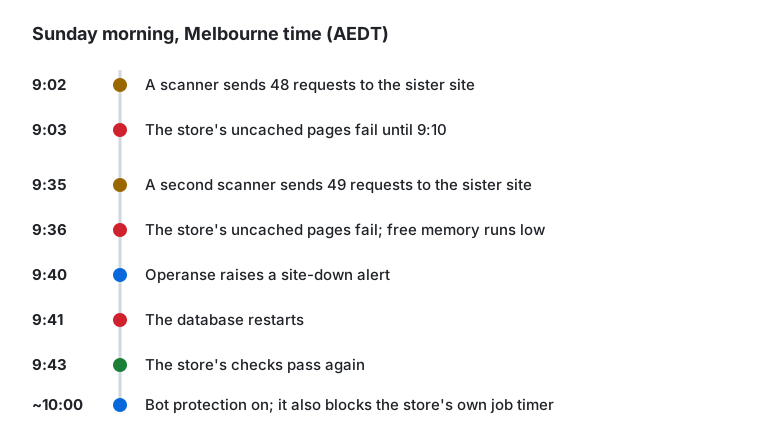
Earlier events now made sense. At 9:02 that same morning, a different scanner had sent 48 similar requests to the sister site, and the store's pages failed from 9:03 to 9:10. Five days earlier, the store had been down for 23 minutes in the middle of the night, with no known cause. Two minutes before it started, a scanner sent about 70 requests to each of the two sites. We haven't checked the memory readings for those two earlier outages.
What stopped the outages
Both sites sit behind Cloudflare through their host's integration. Later that morning, the site administrator turned on the host's Advanced Security Mode, choosing Enterprise Bot Protection. It challenges traffic Cloudflare identifies as automated, and lets known crawlers like Googlebot through. The scanner traffic stopped reaching the server, and there have been no outages since. It has only been two days, so we're still watching.
The side effect: scheduled jobs stopped
The store runs its WordPress scheduled jobs from a server timer. Every five minutes, it asked the store's public address to run them, using a command-line download tool called wget. That request went out through Cloudflare like any other visitor. From about 10:00, the bot protection challenged it, and wget can't answer a challenge. So the jobs stopped.
About twenty minutes later, the Operanse plugin showed a warning in the store's admin: it hadn't collected readings in 21 minutes. That's how the problem was noticed.
The fix was to run the jobs on the server itself instead of through the public address. In the host's cron settings, the wget line was replaced with a WP-CLI command that runs every minute:
* * * * * cd /path/to/public_html && wp cron event run --due-now --quietThis never leaves the server, so bot protection can't block it. Readings have arrived normally since.
Recommended follow-up
Two changes would protect the store if scanner traffic ever gets past the bot protection:
- Limit how many PHP workers the sister site can run at once, so it can't use up the memory the store needs. On this host, that's a PHP-FPM setting for each application.
- Review which plugins the sister site really needs on every request. WooCommerce is the largest share, at about 90 MB in the test. It also runs two SEO plugins, which together added about 20 MB.
What to check on your store
Find out what shares your server. Ask your host or developer which other sites run on the same server, including old ones you may have forgotten about. If they share its memory, a problem on one of them can take your store down, and nothing in your own logs will explain why.
Find out what a "page not found" costs. Scanners ask almost every site for files that don't exist. If your host's request log records memory per request, check a few 404 responses. If each one starts the full WordPress stack with all its plugins, ask whether these requests can be blocked before they reach WordPress. Cloudflare firewall rules and your host's bot protection can both do it.
Test your own automation after turning on bot protection. Anything that reaches your site through its public address can get challenged. That includes a cron job that calls wp-cron.php with wget or curl, stock or feed syncs, and webhooks from payment and shipping services. On the day you switch it on, check that scheduled jobs still run and that orders still send their emails.
Watching your own store
Operanse raised an alert about this outage four minutes after the first failed check. It also showed that the store's WordPress logs had no matching errors. Finding the scanner took a person reading the server's logs. Here's how Operanse works.